The obvious approach loses edits
An open map lives in a Yjs document, in a room on a Cloudflare Durable Object, and the room saves its copy to the database. So the obvious design, an API that writes rows, has two problems. The write never reaches open canvases, and the room can save its older copy over it.
Writing through the room alone doesn't work either. The MCP endpoint is stateless, with a fresh server for each request, and an agent's edit has to apply completely, be permission-checked and land in History as one step. So an edit takes this path:
AI app
  |  edit_map over MCP (stateless HTTP, OAuth token)
  v
Next.js route
  |  1. load the map into a working copy
  |  2. apply every op; any error stops here
  |  3. place new nodes, diff against the original
  v
Postgres: apply_graph_changes, as the user
  |  one transaction: nodes, links, history event
  v
Durable Object: the map's Yjs room
  |  the same rows, in one Yjs transaction
  v
Every open canvasAgents read text, not a graph
A map is a graph of nodes with positions, sizes and metadata. That shape suits a canvas, but most of it is noise to a language model, and every id is a chance to get something wrong. So agents see an outline instead.
Launch plan #launch
  Announcement &announce
  Pricing page &pricing
  $task title:"Before launch"
    [x] Pick the launch date
    [ ] Write the announcement
    [ ] Check the pricing page
---
&announce -> &pricing : links to
Indentation sets the parent. $task sets the node type. Existing nodes have short hex ids such as a1b2c3, and &name lets one call refer to a node it's creating in that same call. Links come after the ---. read_map prints this format and the write tools accept it, so an agent only learns one.
We measured a real 16-node map with 16 links. The outline is 1,187 characters, and Shiko's own trimmed JSON export of the same map is 5,704, nearly five times the size.
Four tools instead of eight
Tool definitions cost context before an agent does anything. Our eight real tools come to 7,367 characters of names, descriptions and schemas, 4,001 of them for edit_map alone. So an app connects to four small meta tools, 1,417 characters in all, and asks for a schema only when it needs one: search_tools, describe_tools, run_read and run_write.
Splitting read from write has a second benefit. run_read is marked read-only and run_write destructive, so an MCP client can approve reads automatically and ask before writes. Calling a write tool through run_read is rejected.
A call either fully applies or changes nothing
A single edit_map call can hold up to 300 operations: add an outline, update, move or delete nodes, add or remove links, tidy the layout.
{
  "map": "a1b2c3",
  "ops": [
    {
      "op": "outline",
      "under": "d4e5f6",
      "text": "Support plan &support"
    },
    {
      "op": "link",
      "from": "&support",
      "to": "77e01a",
      "label": "needs"
    }
  ]
}
None of them touch the database as they run. We apply them to a working copy, place new nodes beside their parents and work out the difference. Here's a real call with one valid operation and one bad id, and the real reply:
{ "map": "acc2cb", "ops": [
  { "op": "add", "under": "de7f21", "text": "This node must not appear" },
  { "op": "update", "id": "ffffff", "text": "This id does not exist" }
] }

Nothing was written:
op 2 (update): no node "ffffff" (deleted, or from another map?)
We checked an open canvas afterwards, and the valid node never appeared. A half-finished edit on a map your team is looking at is worse than a failed one, and the reply gives the model what it needs to fix the call. Writing one big call is also what the plan limits reward: one call counts as one edit, whatever its size.
One transaction, as the user
The changes and the history event go to Postgres in one function, apply_graph_changes, so you can't get an edit without its history entry, or the reverse. It runs with the user's own token, so the row-level security that applies to the browser applies to the agent. Extra restrictive policies on tokens with a client_id mean an AI app can't delete a map or change sharing, even by calling the database API directly.
A per-map advisory lock lets only one agent write to a map at a time. If a node the agent wants to update has been deleted by then, the function raises GRAPH_CHANGED and rolls back, and the model is told to start over:
The map changed while you were editing it (a node you're updating was deleted). Nothing was written. Read the map again and retry.
Then it joins the room
Once the transaction commits, the server posts the same rows to the map's room, which applies them in a single Yjs transaction. Simplified, it looks like this:
doc.transact(() => {
  meta.set('lastMutationBy', 'agent:<clientId>');
  meta.set('skipHistoryOnce', true);

  for (const record of upsertNodes) nodesById.set(record.id, merged(record));
  for (const record of upsertEdges) edgesById.set(record.id, merged(record));
  for (const id of deleteEdgeIds) edgesById.delete(id);
  for (const id of deleteNodeIds) nodesById.delete(id);
});
Four small details make this work:
- Every tab applies it. A tab skips only its own echo, so the change reaches everyone, including the person who connected the agent. It's recorded as
agent:<clientId>rather than a user id, so it's never mistaken for a person's edit. - History is written once. The server has already recorded the event, so
skipHistoryOncestops it being recorded again from the room. - Updates keep their origin. The merge keeps a record's original creator and creation time, whatever the update says.
- The push happens even if nobody's there. The room keeps a saved copy of the map, and that copy has to match the database for whoever opens it next.
The order matters: database first, room second. If the push fails, the edit is still saved, and the agent's reply says that open canvases may need a reload. On success, the reply looks like this:
Saved to "Annual price change": +3 nodes, 12 updated, +3 links, 1 link removed
Refs: risks=6ce205
The user can undo this from the map's History panel ("Claude Code").
We tested this with a map open in a browser and a marker set on the page to prove it never reloaded. The node count went from 13 to 16 within about two seconds of the call, with the page untouched.
Undo means going back to a point
Each agent edit is one History event under the app's name, and anyone with edit access can restore the map to any earlier point. We tested it by having the agent delete a branch, watching it vanish from the open canvas, and restoring from History. All three nodes came back with their notes, and the agent saw them on its next read.
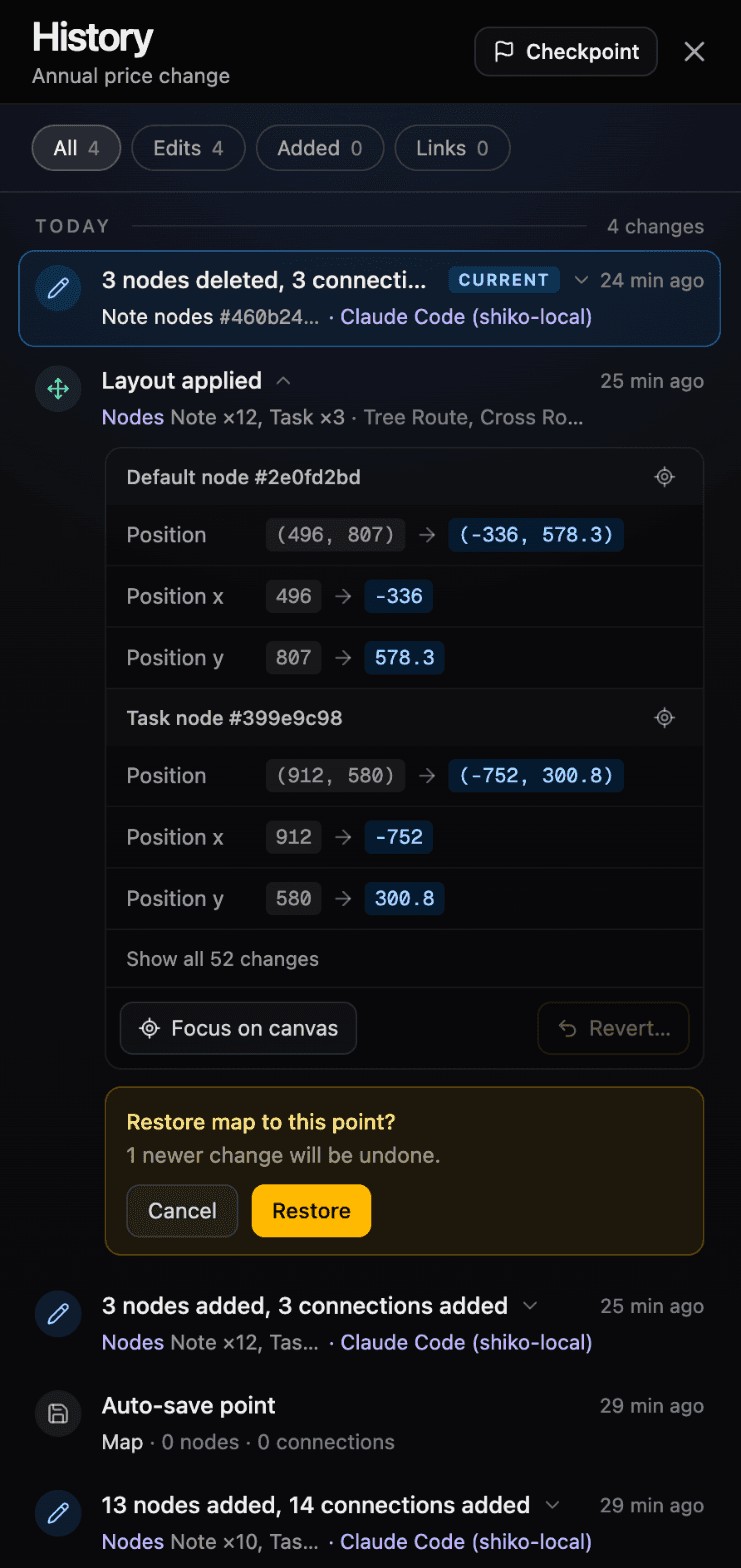
Note what this is and isn't. It restores the whole map to a point, so anything newer goes too, including a person's work. The panel warns you first (“1 newer change will be undone”). It isn't a selective undo of only the agent's step.
Why edits arrive all at once
It would look better if an agent's nodes appeared one at a time. We don't drip them from the server, because a room can hibernate between messages, and a slow stream would break the guarantee that an edit is one atomic change and one History step. Any animation belongs in the browser, replaying a batch that has already been saved.
What we haven't solved
- The last write wins. The lock only covers agents, and
GRAPH_CHANGEDonly catches deleted nodes, so an edited node isn't detected. If a person and an agent change the same node at once, one change is lost. The damage stops at that node, but it isn't real conflict resolution. - Agents estimate sizes. The browser measures a node after rendering it, and a server can't. We measured how each node type renders and work from its text, which kept a test map of 43 mixed nodes free of overlaps. Wrapped text is still a guess, though, so unusual content can land too close until someone runs Tidy in the app.
- Link routes wait for the app. Agent edits move nodes, but existing links keep their stored routes until the map is next laid out in a browser.
- Access isn't per app. A connected app gets your role on each map, with no way to limit one app to reading.
Want to try it? Here's how to connect your AI app to Shiko.