Why launches run late, even with a plan
In 1979, Daniel Kahneman and Amos Tversky gave a name to something every project team knows: the planning fallacy. People estimate how long their own work will take by imagining it going well, and they underweight how often similar work has gone badly. Plans come out too optimistic, even from people who have been burned before.
A launch makes this worse, because the plan crosses teams. Product, marketing, support and sales each keep their own list, and each is reasonably on track. The trouble sits between the lists: the announcement that assumes a feature, or the support team that finds out from a customer.
One well-known counter is the premortem, described by psychologist Gary Klein. Before you start, imagine the project has already failed and ask why. It makes it safe to name worries that people would otherwise keep to themselves.
Where launch plans go wrong
- The plan is scattered. Tasks in one tool, dates in a spreadsheet, copy in a document and risks in someone's head.
- Dependencies stay hidden. Each team sees its own list, not who is waiting on them.
- Risks surface late. The worry someone had in week one gets said out loud in the last week.
- Work piles up on one person. Nobody notices until that person is the bottleneck.
- Status means a meeting. Finding out where things stand takes a round of questions.
One launch, played out in Shiko
The team below is made up for this page: an invoicing app launching recurring invoices. Every screenshot is a real Shiko map we built by following these steps.
They start with the failure
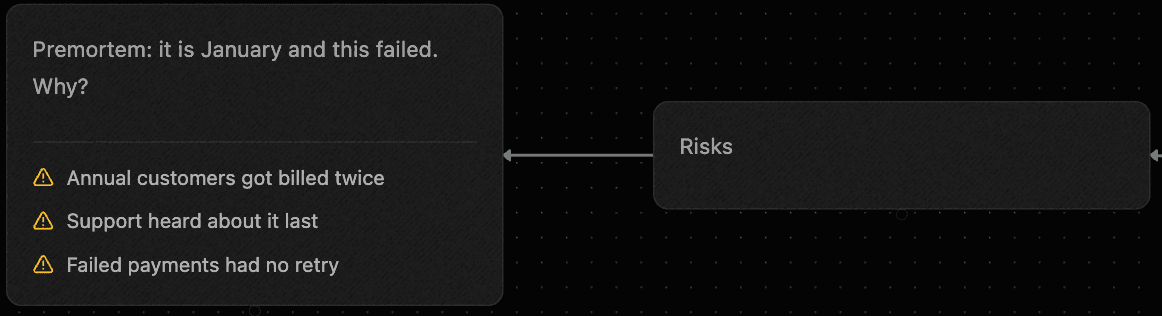
The team creates a map from the Project Plan template, then starts under Risks, not with the tasks. They imagine it's January and the launch went badly, and they write down why.
Each worry becomes a task
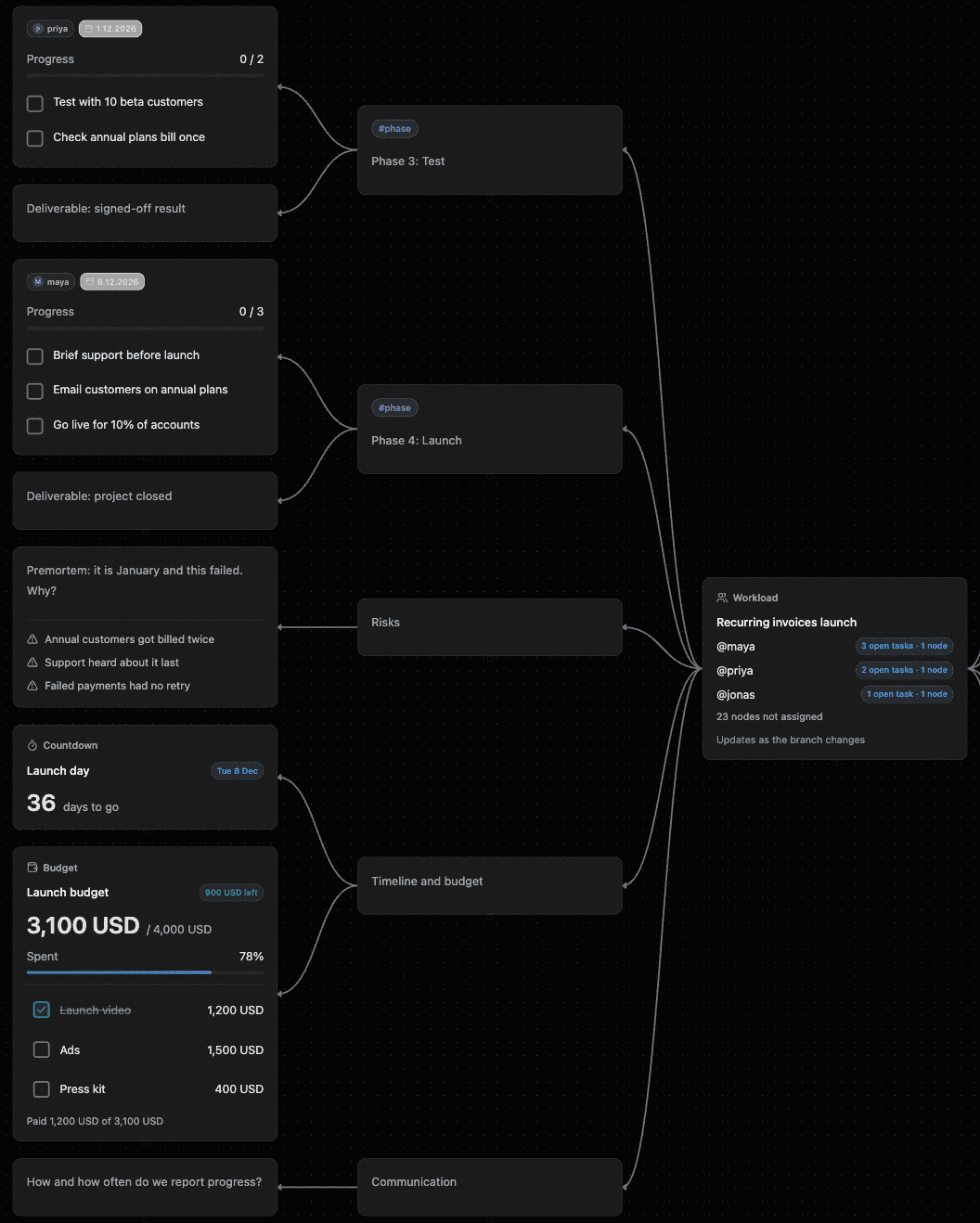
This is what a premortem on a separate slide can't do. Each reason goes straight into the phase that prevents it. Priya adds “Check annual plans bill once” to Test, Jonas adds “Retry failed payments” to Build, and Maya adds “Brief support before launch” to Launch. Each task node gets an owner and a date in plain text, such as @priya ^2026-12-01.
The whole plan on one screen
As the plan grows, nodes crowd together, so they pick the Mind map layout, which arranges every branch around the centre. They turn the node at the centre into a Workload view, and it shows who holds how many open tasks.
Dates and money, next to the plan
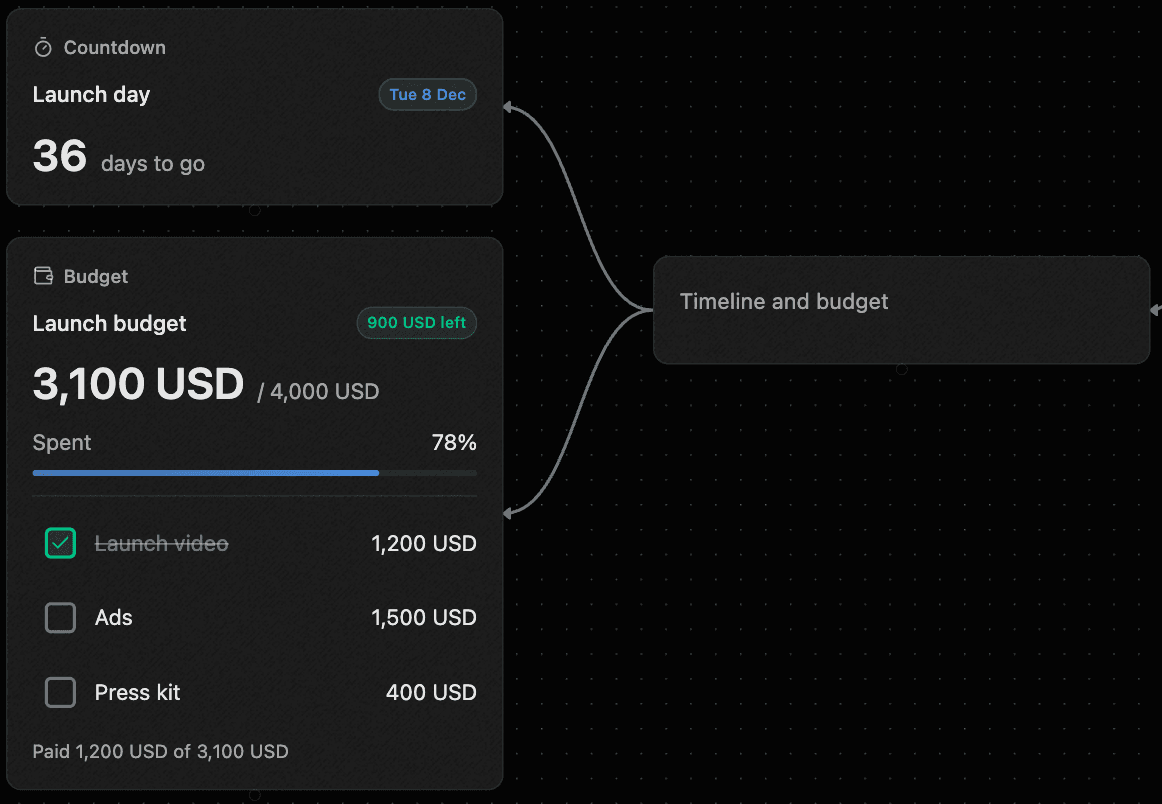
Under Timeline and budget, a Countdown node shows the days left and a Budget node adds up the spend. Ticking “Launch video” marks it paid. Both are written as a single line of plain text, and anyone on the map can see them without asking for a spreadsheet.
Asking for a second opinion
On Pro, the team can run a saved recipe like Counterpoints or SWOT on a branch to look for what they missed. The suggestions wait on the canvas, so someone has to accept each one before it joins the plan.
How Shiko handles each problem
A project tool assumes you already know the work and tracks it. A whiteboard helps you think, then leaves the tracking to something else. In Shiko, you do both on the same map, so the plan you argued over is the plan you track.
- The plan lives in five different tools
- Tasks, dates, budget and risks sit on one map, so there’s one place to look and nothing to keep in sync.
- Teams can’t see each other’s work
- Each phase is a branch anyone can read, and links show where one team’s work depends on another’s.
- Risks come up too late
- A premortem takes minutes on the map, and each reason it finds can become a task in the phase that fixes it.
- Nobody can see who is overloaded
- Workload reads the map and shows open tasks per person. You don’t have to report anything, because it counts what’s already there.
- Status takes a meeting to find out
- Progress is counted on each task node, and the countdown and budget update on their own. Open the map and you can see where things stand.
A launch timeline to copy
Adjust it to your size. A small feature might squeeze this into two weeks, but the order still holds.
- 6 weeks out: agree what this is
- Who it’s for, the one-line pitch, the price and the date. Run the premortem now, while changing the plan is still cheap.
- 5 weeks out: split the work
- Give each phase an owner. Link the branches where one team is waiting on another. Check Workload for anyone holding too much.
- 4 weeks out: write everything down
- Draft the launch post, emails and help articles. Set the budget and book anything that has a lead time.
- 3 weeks out: test with real people
- Put it in front of beta customers. Expect surprises, and leave time to act on them.
- 2 weeks out: cut scope if you need to
- If the Countdown and Branch progress disagree, this is the last cheap moment to drop something.
- 1 week out: brief everyone
- Support and sales hear it from you, before customers do. Agree how you’d roll back, and who decides.
- Launch day: release in steps
- Start with a small share of accounts if you can. One person watches the numbers and one watches support.
- 1 week after: look back
- Compare what happened with your premortem, then run a retro while people still remember the details.
Questions
Is there a launch plan template?
Yes. Pick Project Plan when you create a map. It starts with goal and scope, people, four phases from Plan to Launch, risks, timeline and budget, and communication.
Why use a mind map instead of a project tool?
A launch starts as a messy set of ideas across several teams, and a map lets everyone see all of it and how it connects. In Shiko, the same map then holds the tasks, dates and progress, so a small team may not need a separate tool.
Can a whole launch fit on the free plan?
A small one can. A Free map holds 50 nodes and 3 collaborators. Pro is $12 a month for the map's owner and removes those limits.
Can I show engineering work on the map?
Yes. The GitHub issue plugin shows the title, state and labels of a public issue or pull request right on the map.
Can my AI app help plan the launch?
Yes. Connect Claude, ChatGPT or Cursor over MCP, and it can turn your launch brief into a map, read the plan and add what’s missing. Every change can be undone from History.