Two takes on the same idea
MindMeister launched in 2007 as a mind mapping tool that runs in the browser. It belongs to a family of products: its maker, MeisterLabs, also builds MeisterTask, and MindMeister's features page sends tasks there.
Shiko is much newer and takes a different view: that the map shouldn't stop being useful when the brainstorm ends. So the planning happens on the map, instead of in a second app.
What happens after the map is drawn
In a two-product setup, ideas live in one place and work in another. That suits teams who already run a task board, but the reason behind each task stays back on the map, and someone has to keep the two in step.
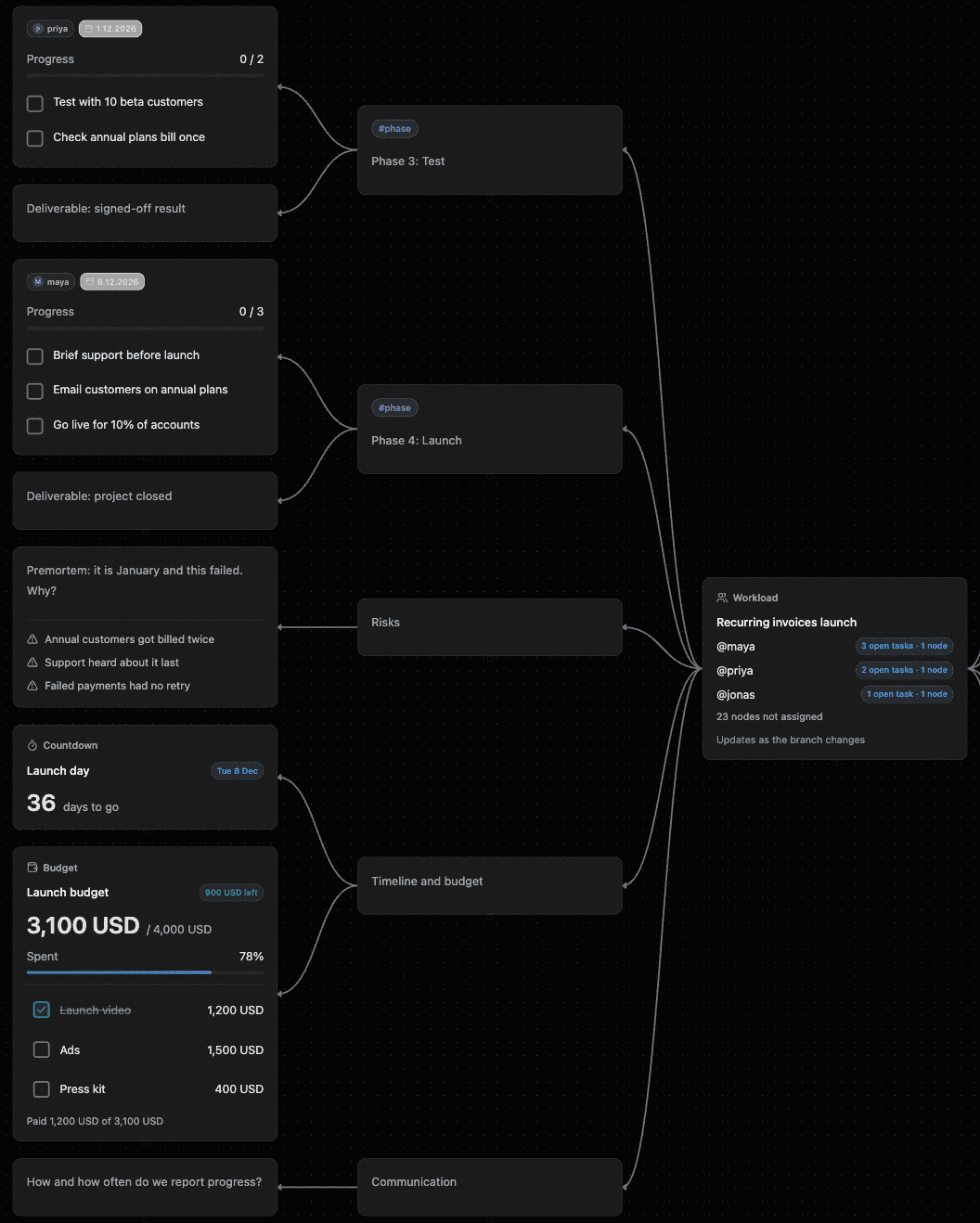
In Shiko, a task node sits on the branch it came from, with its owner, date and priority. Plugins sit beside it. In the launch plan below, the risks, tasks, countdown and budget are all one map, and Workload at the centre counts each person's open tasks from what's already there.
Typing instead of clicking
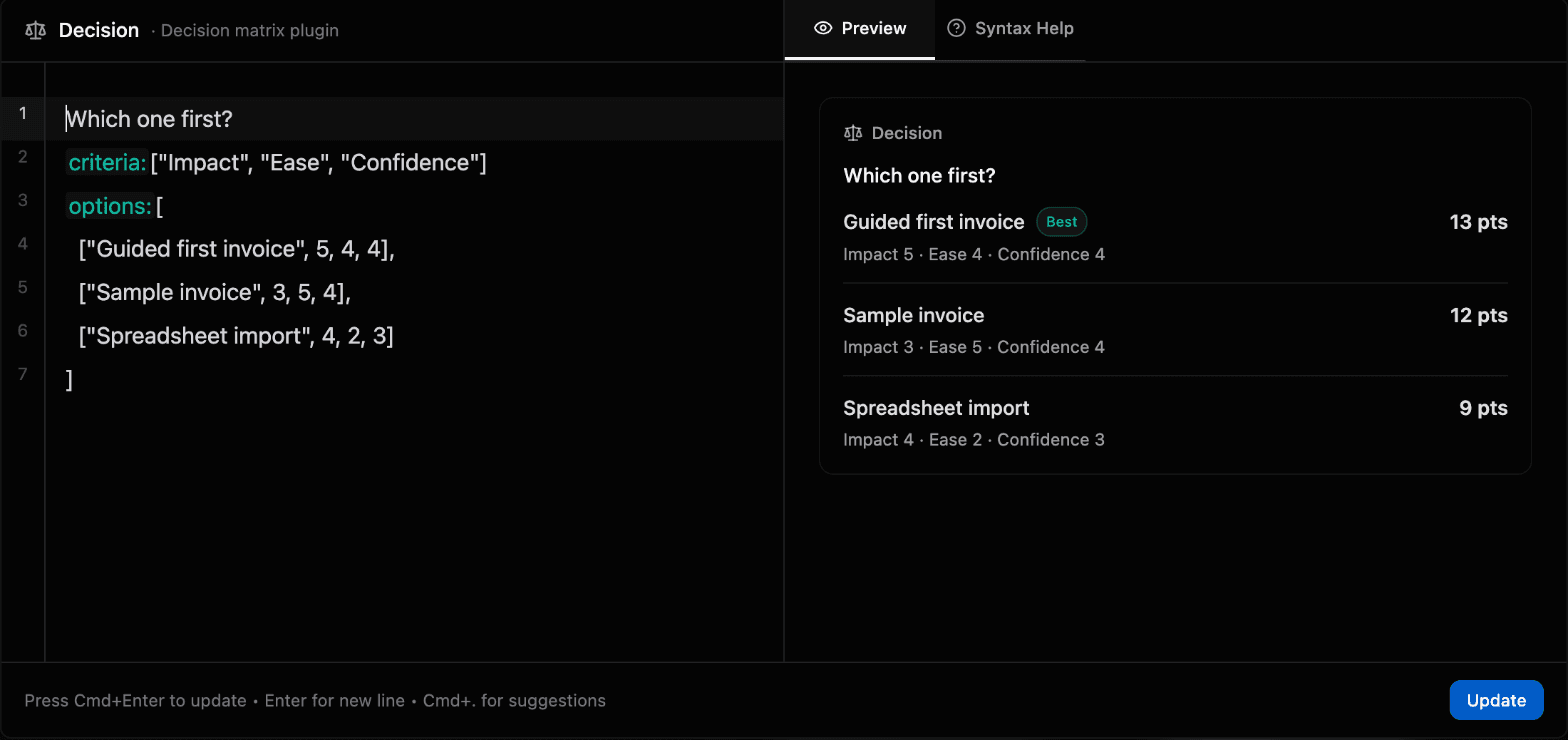
Most mind map tools work by adding a topic, then setting its details with menus and icons. Shiko's node editor is plain text: you write what the node is, and the preview shows it taking shape. That matters most in a live session, when you're trying to keep up with a conversation. This decision matrix is just a few lines of text.
Different bets on AI
MindMeister's AI helps you start: it builds a map from a prompt or an uploaded document, with credits on every plan. Shiko's built-in AI, on Pro, works on a map you already have: it expands ideas, finds connections and answers questions about a branch, and waits for someone to accept each suggestion.
Both also connect to outside AI apps over MCP. Shiko has setup steps for Claude, Claude Code, ChatGPT, Cursor and VS Code, and works on the free plan. That's also how you create a whole map from a prompt or document in Shiko. See how AI apps connect to Shiko.
Side by side
| Feature | Shiko | MindMeister |
|---|---|---|
| Live editing together | Yes, with named cursors | Yes |
| Comments | Threads, @mentions and reactions | Yes |
| Tasks | On the map, with an owner, due date and priority on each task node | Through MeisterTask, a separate product |
| Boards and tracking | 13 plugins on the map, including Kanban, OKRs and budgets. You can write your own | Through MeisterTask |
| Built-in AI | Pro: 100 actions a month to expand ideas, find connections, ask questions and run recipes | Credits on every plan, from 500 a month, to build maps from a prompt or a document |
| AI apps over MCP | Claude, ChatGPT, Cursor, VS Code and more. Free includes 50 edits a month, Pro has no monthly cap | In beta on every plan, for connecting to Claude. Its help pages also mention other compatible apps |
| Free plan | 3 maps, 50 nodes per map, 3 collaborators per map | 3 maps, unlimited collaborators |
| Paid price | $12 a month or $120 a year, with unlimited maps, nodes and collaborators | About €6 to €15 per user a month, depending on plan (European prices) |
| File export | PNG and SVG on every plan. PDF and JSON on Pro | From Personal: PNG, JPG, PDF, Markdown. From Pro: Word, PowerPoint |
| Version history | Free 24 hours, Pro 14 days, showing who or which AI app made each change | Free and Personal 7 days, Pro and Business unlimited |
Moving your maps across
Shiko has no direct import, so here's the route that works today, if you're on a paid MindMeister plan.
- Export the map from MindMeister as Markdown.
- Connect an AI app such as Claude to Shiko over MCP.
- Give it the file and ask it to create the map in Shiko. It writes an outline, and Shiko builds the map from it.
- Check the result. A Markdown copy can lose styles, comments and attachments, so plan to add those back where they matter.
- Turn the branches you'll act on into task nodes, which is where Shiko starts paying off.
When MindMeister may fit better
MindMeister has been around far longer. It may suit you better if you need to import FreeMind, XMind or MindManager files, want native iOS and Android apps or built-in presentations, or your company requires SAML SSO. Shiko runs in the browser on phones and tablets and is in closed beta, so you'll need a spot from the wishlist.
Questions
Is Shiko a good MindMeister alternative?
Yes, if your team wants one place to think and plan. Shiko keeps tasks, boards and AI on the map, and everyone edits it together, live.
What does Shiko cost for a team?
Collaborators on a shared map don't need a paid account. Shiko Pro is $12 a month for the map's owner, and it removes the limits on maps, nodes and collaborators. MindMeister prices its plans per user, and its free plan also lets collaborators join shared maps.
How do I try Shiko?
Shiko is in closed beta. Join the wishlist to get a spot, and start on the free plan.
Sources
We checked MindMeister's details on November 2, 2026 using its own pages. Plans can change, so confirm anything important there, and tell us at support@shiko.app if something here is out of date.
- MindMeister pricing
- MindMeister features
- MindMeister on Wikipedia
- Connecting MindMeister to Claude
- Importing into MindMeister
MindMeister and MeisterTask are trademarks of their owner. Shiko isn't affiliated with them.