What MCP is, and why it matters for planning
The Model Context Protocol is an open standard, introduced by Anthropic in late 2024, that lets AI apps use outside tools through one common connection. Think of it as a plug: any app that supports it can work with any tool that offers it.
For planning, that changes where the work ends up. An AI chat is a private conversation, while a plan has to be shared, argued with and updated by people who weren't in that chat. MCP lets your AI app put its work where the team already is.
Where AI and team planning collide
- Good plans stay in the chat. The person who asked has the answer. Everyone else gets a pasted summary, if that.
- Copying loses the structure. Owners, dates and what depends on what turn into a wall of text, and the AI can't see what people do with it next.
- You can't see what changed. When an AI edits shared work directly, reviewing it can take longer than doing it.
- It feels risky. Few teams will let an AI loose on shared work unless they can reverse what it does.
One plan, played out with a real AI app
The team and its notes are made up for this page. Everything else is real: we connected Claude Code to Shiko, and these are its actual calls, the actual replies and real screenshots.
The notes after a call
Priya pastes her notes into Claude Code, as messy as they came.
Pricing call, Tues.
Moving annual plan to 144 for new customers. Existing keep
their price for a year? Maya worried support gets flooded.
Jonas: billing change about a week, proration unclear.
Need to email existing customers 30 days before (legal?).
Priya drafts the email. Someone look at competitors.
Launch Jan 15 if legal OK.
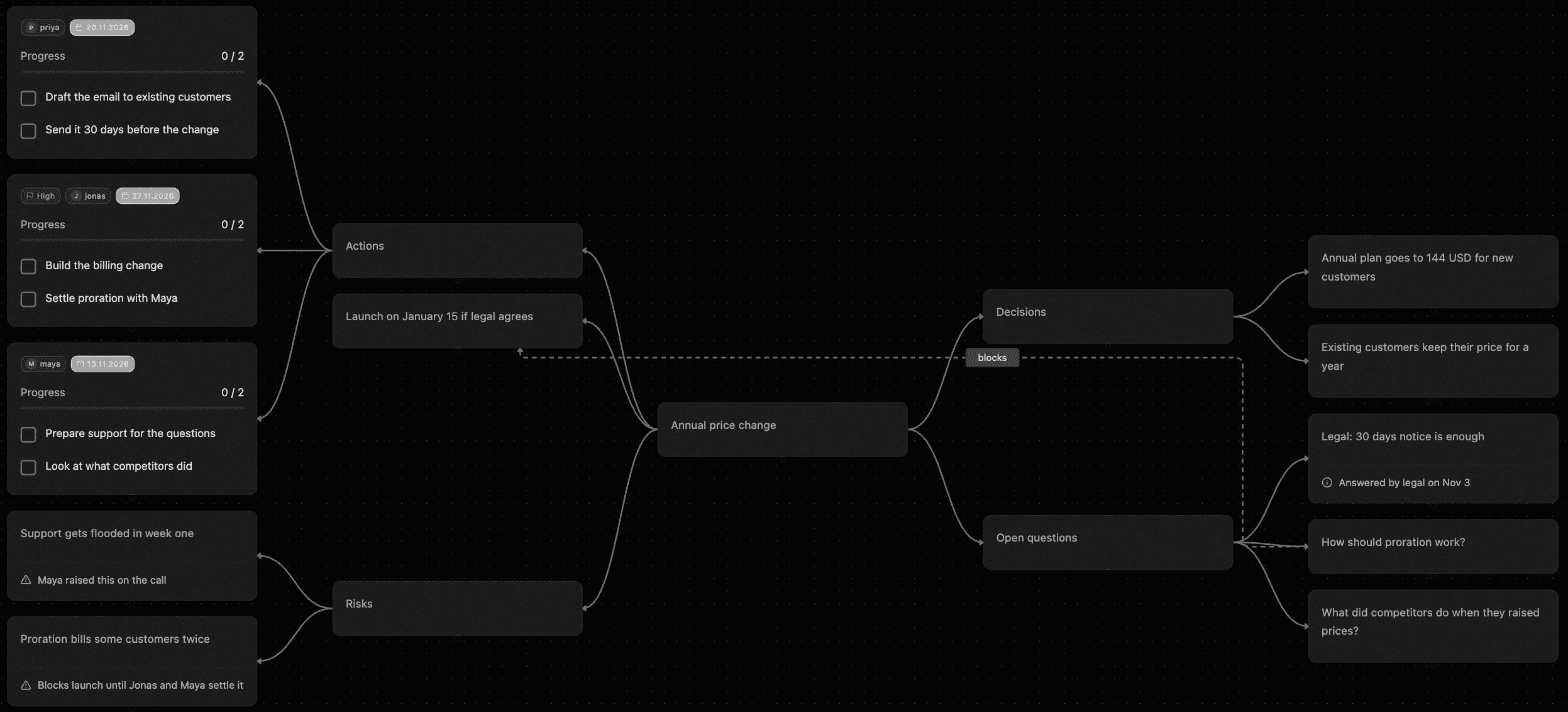
One call later, a shared map
She asks for a map with a task node for each owner. Claude Code makes a single call, and Shiko replies (shortened here):
Created map acc2cb "Annual price change".
+13 nodes, +14 links
The decisions are separated from the open questions. Each person has their own task node with a date, and the two questions holding up the launch are linked to it, labelled “blocks”. Nobody told it the format: the app reads Shiko's guide first.
The next morning, with the map open
Legal answers, so Priya tells Claude Code and asks it to add the risks from the call. Maya has the map open at that moment. Without a reload, the new Risks branch appears and the legal question becomes an answer, and its “blocks” link is gone.
One thing to expect: Shiko can't measure a node until a browser draws it, so it works out the size of nodes an app adds from their type and text. That kept 43 mixed nodes apart in our test, but unusual content can still land too close, and Tidy now sorts it out.
When the AI gets it wrong
Later, someone asks it to clean up the map, and it removes the Risks branch. That was too much. The branch vanishes from every open map, and the deletion is listed in History under Claude Code's name. Maya picks the step before it, and Shiko says exactly what that means.
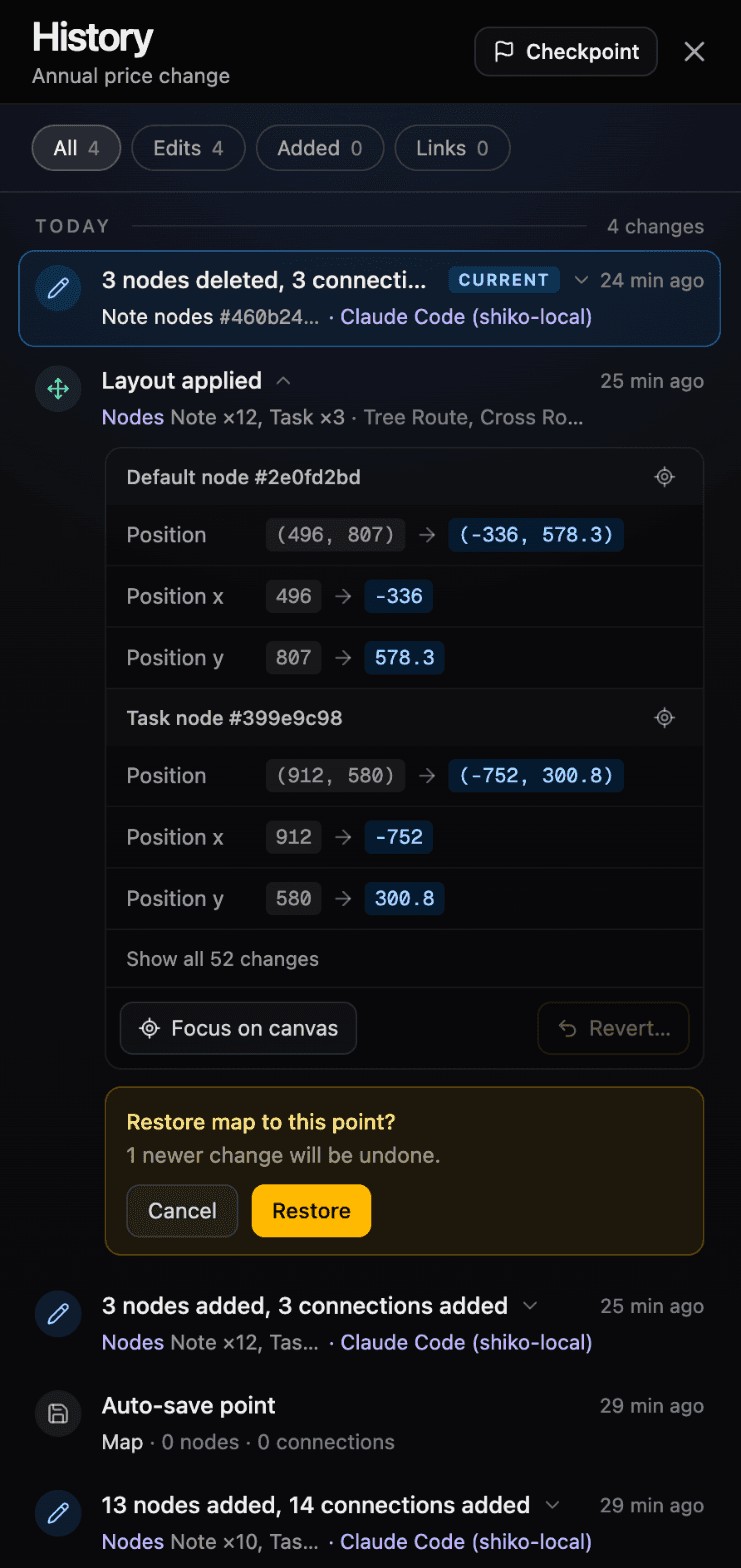
She restores it. All three nodes come back with their notes, and when Claude Code reads the map again, it sees them too.
And when a call fails
We also sent a call with one valid change and one that pointed at a node that doesn't exist. Shiko refused the whole thing, and the valid change wasn't applied either. The reply tells the app exactly what to fix:
Nothing was written:
op 2 (update): no node "ffffff" (deleted, or from another map?)How Shiko handles each problem
- The plan is stuck in one person’s chat
- It lands on a map your team already shares, so nobody needs a screenshot or a summary of what the AI said.
- Copying the answer flattens it
- Your app writes real nodes, tasks with owners and dates, and links between them. It can read them back later and keep working.
- You can’t tell what it changed
- Each edit is a step in the map’s History, under the app’s name, listing what was added, changed and removed.
- One bad edit could wreck shared work
- An edit either fully applies or changes nothing, and you can restore the map to the point before it. An app can’t delete a map or change who has access.
- It works out of sight
- Edits appear on open maps as they happen, so your team sees the plan change without reloading.
Want the technical details? Read how an edit gets from your AI app to every open map.
What we asked, and what happened
Each of these ran for real on the map above. Results depend on your AI app and its model.
- "Turn these meeting notes into a map, with a task node for each owner."
- One call: 13 nodes and 14 links, with tasks grouped by owner and dates kept.
- "Legal says 30 days is enough. Update the map and add the risks we talked about."
- One call: it reworded the question as an answer, removed the link that no longer blocks launch, and added a Risks branch.
- "Find everything about proration across my maps."
- A read that changes nothing. It found both nodes that mention proration.
Connect your app
Every app uses this address and signs in through Shiko, where you approve the connection. No step asks you to paste a token, and you can disconnect an app in Settings › Connections at any time.
https://www.shiko.app/api/mcpClaude: open Settings, then Connectors, choose Add custom connector and paste the address. Sign in to Shiko, approve the connection, then turn Shiko on from the + menu in a chat.
ChatGPT: open Settings, then Apps (called Connectors in older versions), choose Create and paste the address as the server URL, with OAuth for sign-in. Your ChatGPT plan has to allow custom MCP apps.
Claude Code: run this in your terminal, then type /mcp, choose shiko and authenticate in the browser.
claude mcp add --transport http shiko https://www.shiko.app/api/mcp --scope userCursor: add this to ~/.cursor/mcp.json, then approve the connection in the browser.
{
  "mcpServers": {
    "shiko": {
      "url": "https://www.shiko.app/api/mcp"
    }
  }
}
VS Code: run MCP: Open User Configuration, add this, then start the server and approve the connection in the browser.
{
  "servers": {
    "shiko": {
      "type": "http",
      "url": "https://www.shiko.app/api/mcp"
    }
  }
}Limits
- Free: 50 agent edits a month, and the usual 3 maps with 50 nodes each.
- Pro: no monthly cap on agent edits.
- Reads: up to 120 a minute on every plan.
- One edit can hold up to 300 changes, so one large request usually counts as one edit.
Questions
Which AI apps work with Shiko?
Shiko has setup steps for Claude, Claude Code, ChatGPT, Cursor, VS Code. Other apps that support remote MCP servers with OAuth sign-in can connect with the same address. Some ChatGPT plans can only read maps, not edit them.
Does this use my Shiko AI actions?
No. Your AI app does the thinking on its own plan, so Shiko's AI actions aren't used. Free includes 50 agent edits a month and Pro has no monthly cap.
Can an AI app delete a whole map?
No. An AI app can't delete maps, change sharing or see billing. It can delete nodes on maps you can edit, and you can restore them from History.
How does undo work?
History restores the whole map to a point you pick, so anything newer than that point is undone too, including changes people made. Shiko tells you how many newer changes will be undone before you confirm.
Can I give an app read-only access?
Not per app. A connected app gets your access, so it can edit any map you can edit. On a map where you're a Viewer or Commentator, it can only read.
Where does my map data go?
What the app reads from your maps goes to that app, and its own terms then apply. Connect only the apps you trust.