A whiteboard and a map solve different problems
Miro began in 2011 as RealtimeBoard, built so a design agency could share ideas with clients who weren't in the room, and took its current name in 2019. Today it's a broad visual workspace, and a mind map is one of many things you can place on a board, next to sticky notes, diagrams and frames.
A whiteboard's strength is that it has no rules. Anything can go anywhere, which is exactly what you want while a problem is still shapeless. A mind map is the opposite: every idea has a parent, so the structure itself carries meaning, and you can ask questions of it, like how much of this branch is finished.
When a map beats a blank canvas
- You need an answer, not an artifact. A map pushes a group from a question through options to a decision. A canvas leaves the path up to you.
- The work continues afterwards. A structure can count tasks and track progress. Sticky notes in a loose cluster can't.
- Someone wasn't in the room. A tree reads from the centre outward. A busy board often needs the person who made it to explain it.
- You want to type, not arrange. In Shiko, you write nodes in plain text and layout handles the positions. On a whiteboard, arranging things is part of the job.
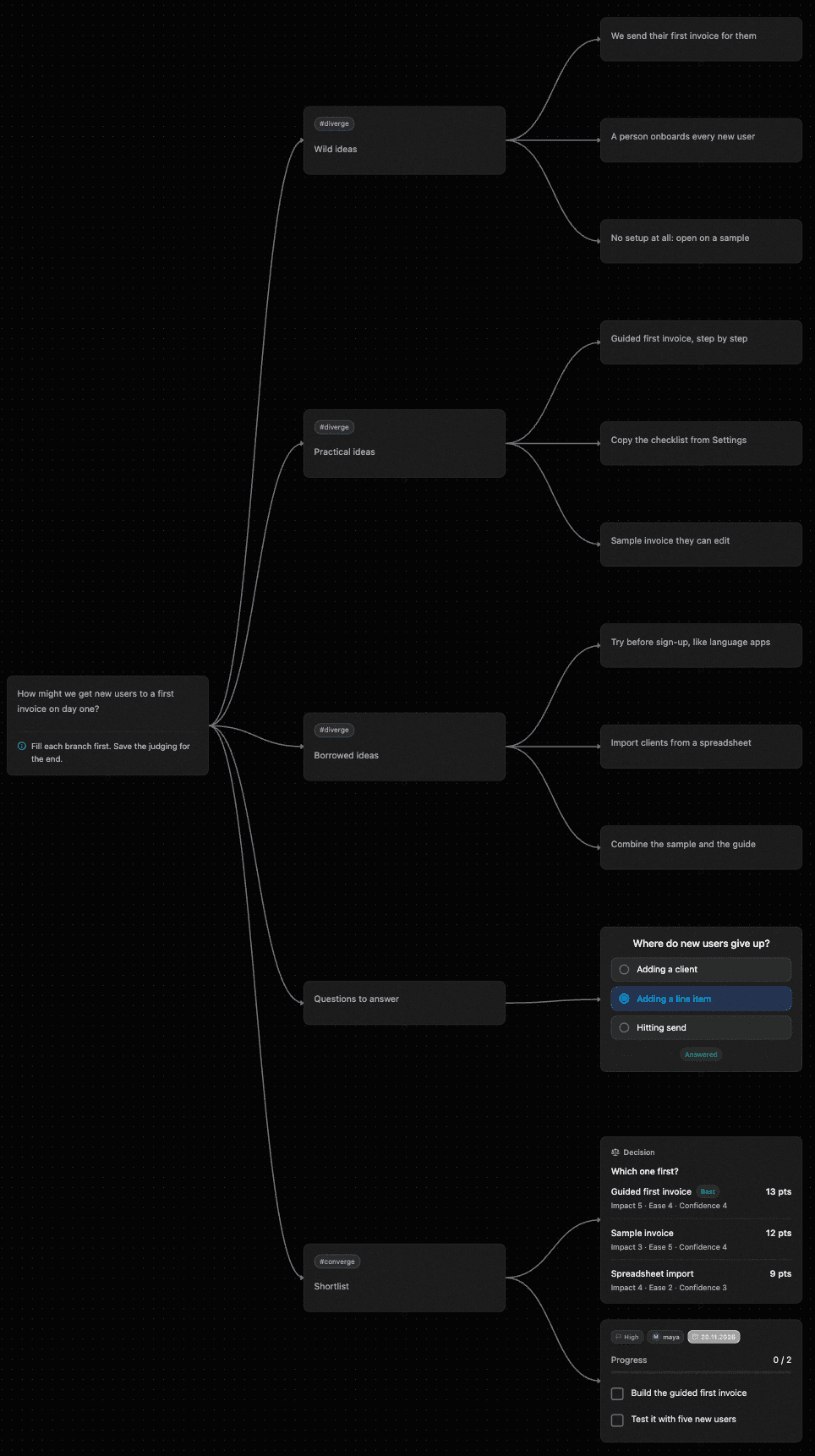
Here's a workshop as a map. You can follow it from the question on the left, through the ideas, to the decision and who owns the next step, with no one there to explain it.
What it costs as your team grows
This is the largest practical difference. Miro charges per member, so the bill grows with the team. Shiko Pro is $12 a month for the person who owns the maps, and the people they invite don't need a paid account.
| Team | Shiko Pro | Miro Starter / Business |
|---|---|---|
| 3 people | $12 | $24 / $60 |
| 8 people | $12 | $64 / $160 |
| 20 people | $12 | $160 / $400 |
Two caveats. If several people own maps, each owner needs their own Pro plan. And Miro's plans include far more than mind mapping, so this comparison only makes sense if mapping and planning are what you'd use it for.
Privacy on the free plan
Miro's free plan has no private boards. In Shiko, maps are private by default on every plan: only the people you invite can see them. That matters if you're trying a tool out with real plans, not sample data. Free also exports PNG and SVG, where Miro's free plan exports in low resolution only.
How AI apps see your work
Both tools connect to AI apps over MCP. The difference comes from what each one is built on. According to Miro's documentation, its canvas tools represent a board as an SVG document, which suits a free-form canvas. Shiko gives apps an indented outline, because a map is a tree. Each Shiko edit either fully applies or changes nothing, and you can undo it from History.
Side by side
| Feature | Shiko | Miro |
|---|---|---|
| Built for | Mind maps that turn into plans | A whiteboard for many kinds of work, mind maps included |
| Live editing together | Yes, with named cursors | Yes |
| Tasks | On the map, with an owner, due date and priority on each task node | Branches can represent tasks. Business syncs tables and timelines with Jira, Azure DevOps and Asana |
| Boards and tracking | 13 plugins on the map, including Kanban, OKRs and budgets. You can write your own | Tables and timelines elsewhere on the board |
| Free plan | 3 maps, 50 nodes per map, 3 collaborators per map | 3 editable boards |
| Private on the free plan | Yes, maps are private by default | No private boards |
| File export on the free plan | PNG and SVG | Low resolution only |
| Paid price | $12 a month or $120 a year for the map's owner. Collaborators don't need a paid account | $8 (Starter) or $20 (Business) per member a month, billed yearly |
| Built-in AI | Pro: 100 actions a month. Suggestions wait until someone accepts them | Credits: 25 per member a month on Starter, 50 on Business, and a small free allowance |
| AI apps over MCP | Free includes 50 edits a month, Pro has no monthly cap | In public beta. 100 calls a day on Free, 500 on Starter, 2,000 on Business |
When Miro may fit better
Miro may suit you better if you want a free-form whiteboard with sticky notes, run workshops with its timer and voting tools, or need Jira and Asana sync or SAML SSO. Shiko runs in the browser and is in closed beta, so you'll need a spot from the wishlist.
Questions
Is Shiko a good Miro alternative?
Yes, if mind mapping and planning are what your team mainly uses Miro for. Shiko is built for that one job. If you use Miro as a general whiteboard, it covers more ground.
Can I move a Miro mind map to Shiko?
There's no direct import. An AI app connected to both tools over MCP can read a Miro board and recreate the map in Shiko, but check the result, because some detail may not carry over.
Do I have to choose just one?
No. Plenty of work suits both: sketch freely on a whiteboard, then bring what you decided into a structured plan. Shiko has no Miro integration, so an AI app or copying by hand is how the content moves.
How do I try Shiko?
Shiko is in closed beta. Join the wishlist to get a spot, and start on the free plan.
Sources
We checked Miro's details on November 2, 2026 using its own pages. Plans can change, so confirm anything important there, and tell us at support@shiko.app if something here is out of date.
Miro is a trademark of its owner. Shiko isn't affiliated with it.