Why group brainstorming so often disappoints
Alex Osborn made brainstorming famous in the 1950s, promising that a group would produce more ideas together than its members would alone. Decades of research found the opposite.
In a 1987 study, Michael Diehl and Wolfgang Stroebe tested why groups fall short. The main cause wasn't laziness or fear of being judged. It was simply taking turns: since only one person can speak at a time, everyone else waits, and ideas fade or never form. Psychologists call this production blocking.
That doesn't make workshops a bad idea. You still need people in the same conversation to build on each other and agree. It means the part where people come up with ideas shouldn't depend on taking turns.
Where workshops go wrong
- People wait. With one person talking, everyone else is holding an idea or has already lost it.
- One person holds the pen. Whoever shares their screen decides what gets written and how it's worded.
- Rank wins. Once the most senior person speaks, the discussion tends to line up behind them.
- The result gets lost. A photo of a wall or a board nobody reopens can't carry a decision forward.
- Nothing happens next. Everyone leaves feeling it went well, and nobody knows who is doing what.
One workshop, played out in Shiko
The team below is made up for this page: a small invoicing app whose new users sign up and then never send an invoice. Every screenshot is a real Shiko map we built by following these steps.
Before: one question and a code
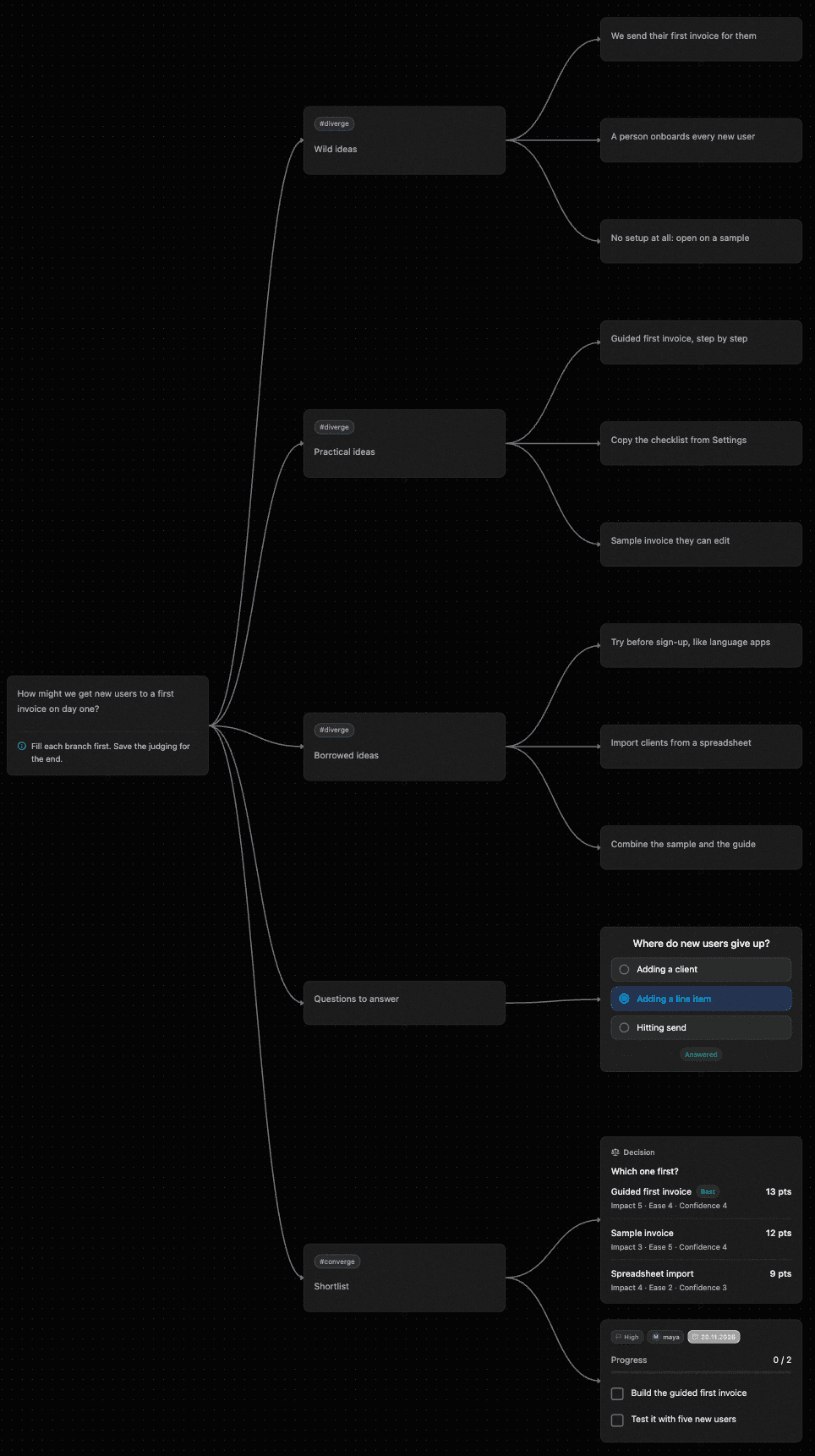
The facilitator creates a map from the Brainstorm template and writes the challenge at its centre: how might we get new users to a first invoice on day one? They turn on the Decision matrix plugin, which only a map's owner can do, and create a room code that lasts until the session.
During: everyone writes at once
The template has three branches on purpose. Wild ideas gives people permission to be silly, Practical ideas covers what could ship, and Borrowed ideas asks what works elsewhere. For ten minutes nobody talks. Nine ideas land on the map, from “We send their first invoice for them” to “Sample invoice they can edit”.
 Shiko
Then: answer what you don't know
Before scoring anything, the group asks where new users actually give up, and a question node records the answer they settle on: adding a line item. Now the ideas that fix that step look more attractive.
Deciding: scores, not volume
Three ideas make the shortlist. The facilitator types them into a Decision matrix with three criteria, and the scores are debated out loud. It's all plain text, so changing a score takes a second, and the totals update as you type.
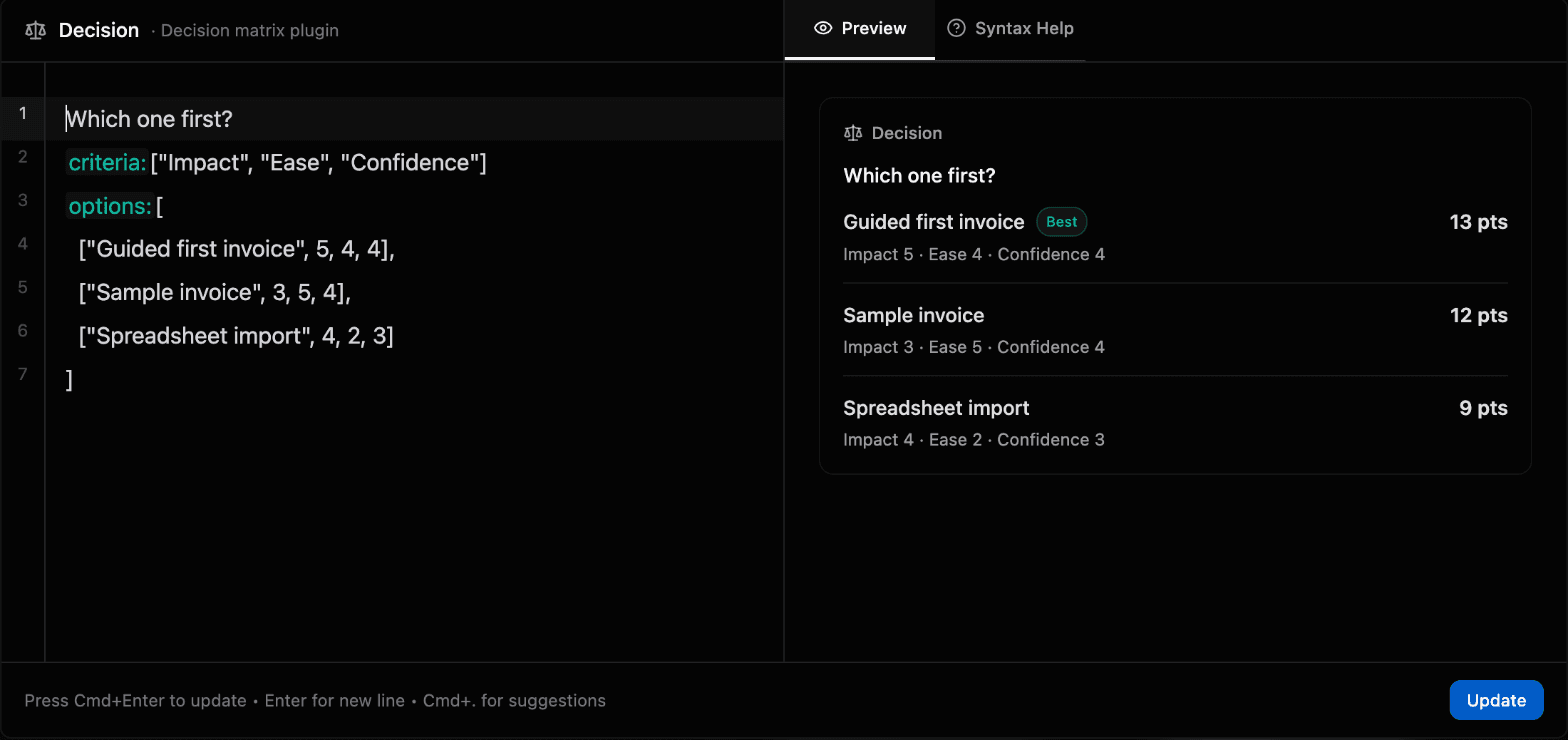
Guided first invoice wins by a single point, on Impact. It's close enough that the team can see it was a real choice, and anyone who wasn't there can see how it was made.
After: one owner, one date
Before anyone leaves, Maya takes the next step: build the guide, and test it with five new users. The task node sits right beside the matrix that justified it.
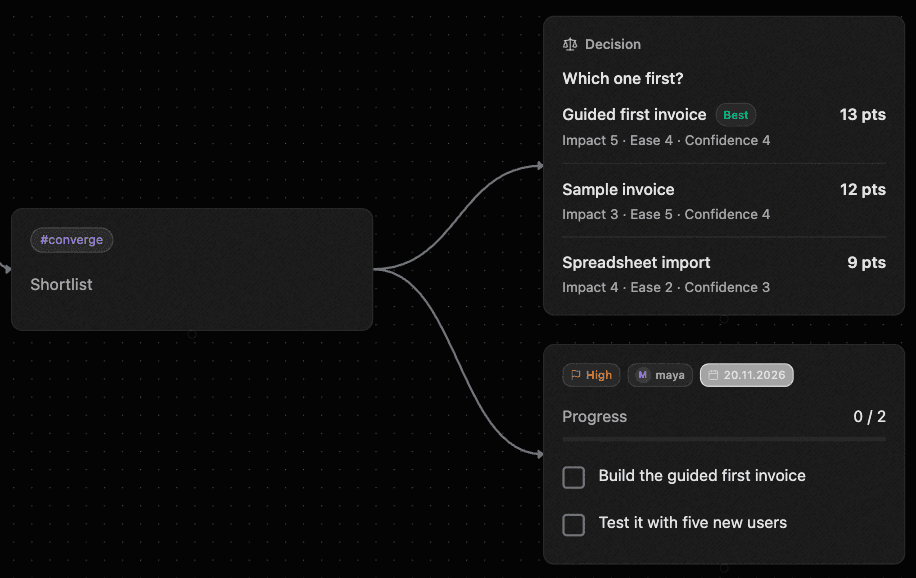
The session ends with the whole conversation on one map: every idea that was considered, what the group learned, what it chose and who is doing it. Nobody has to write it up afterwards.
How Shiko handles each problem
A whiteboard gives people a place to put ideas, and the sorting usually happens later. In Shiko, ideas, decision and next step are one structure, built as the session goes.
- People wait their turn and lose their ideas
- Everyone types into the same map at once, so nobody has to hold a thought until there’s a gap in the conversation.
- One person holds the pen
- There is no scribe to filter what gets written down. Each person adds their own words, under their own name.
- The most senior opinion decides
- A Decision matrix makes everyone argue about the scores. The result, and how it was reached, stays on the map for all to see.
- The output is a photo of sticky notes
- The map is the output. It stays editable after the session, with every idea still where the group put it.
- Nobody owns the next step
- Next steps are written on the map before people leave, as a task node with an owner and a date.
What to do when the session stalls
Most workshops hit at least one of these. Here's what to do in the moment.
- The room goes quiet
- Point at an empty branch and ask for three bad ideas. A deliberately bad idea is easy to write, and it often leads to a good one. The Wild ideas branch is there for this.
- One person keeps talking
- Say "let’s all write for three minutes" and stop the discussion. Written ideas are harder to talk over, and quiet people get the same space.
- Everyone debates the first idea
- Remind them that judging comes last. The template says so on its first node: fill each branch first and save the judging for the end.
- Two options tie
- Check the criteria, not the options. A tie often means the criteria don’t capture what the group really cares about. Change one and the scores update.
- Time runs out
- Skip anything but the last step. Agreeing on one next step, with an owner and a date, matters more than finishing the agenda.
A 60-minute agenda to copy
- 5 minutes, frame it. Read the question aloud and say what a good outcome looks like.
- 10 minutes, write in silence. Everyone adds ideas at once, with no discussion.
- 15 minutes, read and react. Go through the map together. Add comments and fill the gaps.
- 5 minutes, shortlist. Pick two to four options worth scoring.
- 15 minutes, decide. Agree on the criteria first, then score the options in a Decision matrix.
- 10 minutes, assign. Write the next steps as task nodes, each with one owner and a date.
Questions
Is there a workshop template?
Yes. Pick Brainstorm when you create a map. It starts from a "How might we" question, with branches for wild, practical and borrowed ideas, then questions and a shortlist.
How many people can join a workshop map?
A Free map takes up to 3 collaborators and 50 nodes, which suits a small session. If the map's owner is on Pro, the map has no collaborator or node limit, and each room code can admit up to 100 people.
Does everyone in the workshop need to pay?
No. The limits come from the plan of the person who owns the map, so one Pro account covers the map's collaborator and node limits.
Do participants need an account?
During the closed beta, yes: each participant needs an invited account to join a map.
Does Shiko have a timer or anonymous voting?
No. Shiko has no session timer, vote counting or anonymous input, because every cursor carries a name. Your video call’s timer and polls work well alongside the map.